
Lore
CodeWalker
Open-source modification application for Grand Theft Auto V
CodeWalker (CW) is an open-source modification application for Grand Theft Auto V.

Description
The software was created by Dexyfex, also known for creating the real-time procedural universe engine "Galaxia". It started development in early 2017 and was initially designed as an interactive orthographic/2D map generation tool, but quickly developed into a 3D map viewer and editor. The program also allows users to browse, export and edit various GTA V file types.
The latest official release build is version 29 (r29), which was released on March 14, 2018, although the software has since received over 40 development updates for the next upcoming official release build. Development updates are relatively frequent and are committed on GitHub at dexyfex/CodeWalker, for other users to download and use.
The application is open-source, allowing other users to download, extract and modify the software's code. Although the vast majority of CodeWalker's features were implemented by its creator, a number of additional features, including support for additional file types and fixes and improvements to existing features, have been submitted by other users (credited as Contributors) via the host's Discord server or through the use of Git.
Applications
CodeWalker is split into several individual executable applications allowing users to view and explore different files in different ways.
CodeWalker (3D map viewer)
CodeWalker's primary purpose is to render the world of GTA V's San Andreas. It utilizes a free-cam, allowing users to explore the world.

View

The view mode can be changed, controlling what 3D objects are rendered, including World view, Ymap view and Object view. These allow users to browse individual assets, map sections or the entire game world (default).
The 3D map viewer also comes with a host of options and sliders to further control what is rendered:
LODs (including HD, OrphanHD, LOD (level of detail) and SLODs (Super level of detail)
Filter options (scripted maps, time of day maps, etc)
Enable/disabling DLC maps.
Markers
The application can be used to set markers at specific points in the world. These can be set via the current camera position, or by adding markers at specific coordinates. The user can also navigate to coordinates added.
Selection
Users can view, select and interact with a variety of game world aspects in Selection mode:

Selection/view modes:
Entities (mesh objects)
Entity extensions
Archetype extensions (typically used to render particle effects such as water drips, sparks, flies, etc)
Timecycle modifiers (used to control lighting and post-processing filters)
Car generators (defining where cars can spawn parked)
Grass (3D grass batches)
Water quads
Water calming quads
Water wave quads
Collision (collision BVH)
Nav mesh (navigation for peds)
Paths (navigation for vehicles)
Train tracks
LOD lights (lower level of detail coronas for street lights, buildings, etc)
MLO instances (interior assets)
Scenarios
Audio (audio zones)
Occlusion (box and mesh occlusion).
Other options

Options for how the application behaves, the camera and the controls are available: Helpers which are displayed on-screen permanently, regardless of the Selection mode, can also be enabled:
Various other options controlling the rendering and display modes are available:
Lighting and shading controls can also be set:
Full-screen mode
Camera modes (perspective, orthographic, 2D)
Field of view
Map detail level
Train paths
Car generators
Population zones
Skeletons
Marker styles (for dropped Markers)
Rendering modes (Single texture, vertex normals, vertex tangents, vertex colour, texture coordinates, etc)
Texture samplers (Diffuse, normal, specular, heightmap, fog, etc)
Wireframe mode
HD texturing
Near/far clipping
Deferred shading
HDR rendering
Shadows
Skydome
HD lights
Natural/artificial lighting
Time of day/light direction
Weather
Clouds
CodeWalker Ped Viewer
CodeWalker Ped Viewer is a separate CodeWalker application that allows the browsing and viewing of game ped and animal models. Users can then select the available ped clothing components for that ped, view the ped's LOD models and textures, and preview animations on them.

The available peds include in-game and cutscene peds from both GTA V and GTA Online DLCs, as well as animals.
Components
Depending on the selected GTA V ped, a variety of ped component options may be available, each contained within drop downs for individiaul component categories:
• (Beard)
• (Upper body)
• (Lower body)
• (Teeth/mouth)
• (Accessories; bags, belts, etc)
• (Decals; badges, stickers and other decals)
• (Jackets/bibs)
Animations
The animations field allows the playback of any animation on the selected ped. By default, the ped's preset animation clip dictionary (defined in the ped's entry in ) is loaded and individual animations from that dictionary can be selected and previewed instantly, however, the user is also able to input the file path for any other clip dictionary and play back an animation clip from that, allowing for some peculiar results.
CodeWalker Vehicle Viewer
CodeWalker Vehicle Viewer is a separate CodeWalker application that allows the browsing and viewing of game vehicle models. Users can view the vehicle's collision models, window glass shards, wireframe, vertex information and textures. The vehicle's manufacturer and name are also displayed (retrieved from global text files; those shown on the HUD).

Features include:

• High detailed fragment - renders the higher detailed model (rendered when close up; Enhanced version model improvements)
• Collision meshes - renders all collision bounds and meshes (includes dummy collision bound and wheels)
• Skeletons - renders all skeletal bones and relationship lines
• Window shatter maps - renders vehicle glass window shards and their shatter maps (used to generate procedural broken window glass fragments)
CodeWalker RPF Explorer
CodeWalker RPF Explorer is a separate CodeWalker application that allows general exploration and editing of GTA V's game files. It uses a file manager system with a similar look to that of Windows Explorer, complete with a hierarchy tree on the left-hand side.

Navigation through the game files is done seamlessly by clicking on files on folders. Users can also expand and collapse folders in the aforementioned hierarchy tree to preview the child contents before browsing. A "Search" function is also available, allowing users to search for file or folder names containing any input text. A list of search results can then be selected, copied or exported.
The vast majority of file types can be opened and previewed by double clicking on them. If edit mode is enabled, the ability to edit the contents of most text or meta-based files is possible in later versions of RPF Explorer.
While extracting files was possible in earlier versions, in later versions, RPF Explorer allows users to export many different file types to an XML format, by right-clicking on the selected file. The exported file will be appended with the "XML" suffix and can then be edited in a basic text editor (such as Notepad or Notepad++) and re-imported. Depending on the file type, the exported XML may also be accompanied with a folder containing other assets, such as DDS textures or WAV sound files. Export and import of files also supports the ability to drag and drop. The importing or editing of files requires "edit mode" to be enabled.
The RPF Explorer provides access to a number of Tools also accessible in the initial CodeWalker 3D application:
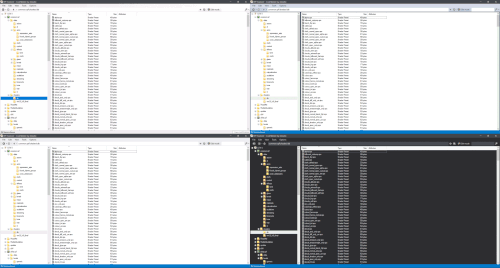
Support for different themes is also available in RPF Explorer:
• Binary search
• Audio Explorer
• JenkGen
• JenkInd
• Default (Windows)
• Blue
• Light
• Dark
Old RPF Browser
Prior to build version 27 (r27), CodeWalker's file browser (then known as the "CodeWalker Explorer") used a binary search system similar to that of the dedicated Binary search tool. To browse the game's files, users would have to first scan the GTA V folder and generate a list of package files, each of which can then be expanded and browsed. The file system didn't allow for the initial preview of these files until further updates, but did allow for files of certain types to be exported, such as basic metadata, map data and texture files. A Texture preview tool was also supported, allowing textures contained within texture dictionaries to be viewed.
The RPF Browser was essentially replaced with the current RPF Explorer application added in version 28 (r28), however the original browser can still be accessed within the "Tools" section of the current RPF Explorer, where it is labelled as "Old RPF Browser".
Tools
List of tools available in CodeWalker dev44.
Image example - Selection info Selection info displays information on selected entity objects in the 3D viewer. It allows users to browse a selected entity's hierachy and shaders and textures it uses. - Project window modifications. CodeWalker projects can be saved and opened as an file extension. Project supports the creating and editing of (map), (archetype), (collision bounds), (path nodes), (nav mesh), trains, scenario and audio data files. - Cutscene viewer Cutscenes can be browsed and played back in real-time using the Cutscene viewer. Audio playback and closed captions are also supported. A list of objects and animations used in the cutscene are also shown. - Audio Explorer The Audio Explorer can be used to browse audio data file entries. It displays a hierarchy of the selected audio entry. Entries can be browsed by audio data file extension and audio entry type. - World search The world search tool allows users to search for a particular entity or arcehtype and find all of its uses and their locations within the world. The tool will generate a list of matches within individual map files. A selected result can then be marked on the map using a Marker, or navigated to directly. The results can also be exported to a text file. - Binary search Similar to world search, binary search performs a search for matches. Users can input either text or a hex hash to search, and limit their search to particular file types, or perform a wide-scope search across the entire game. It will search for matches within individual files. If the file is small enough, a preview of the match will be generated. For larger files, the file can be exported directly. Binary searches can also be performed in files and folders outside of the GTA V directory using the file system search. - JenkGen JenkGen, an abbreviation of Jenkins hash generator, is a small tool able to generate a hash based on an input. The generator will generate a signed and unsigned integer value (using QWORD and DWORD architecture), as well as a hexadecimal value, in either UTF-8 or ASCII encoding. The tool is named after the hashing algorithm used to generate a large amount of hashes within GTA V, Jenkins hash function. - JenkInd JenkInd, an abbreviation of Jenkins index lookup, is a small tool to perform a reverse search signed and unsigned integer value, as well as hexadecimal value hashes. If a string matching the hash is defined in global text files or in the Jenk Index database itself, results for the potential matches will be listed. -
Extract options - Extract scripts Extract raw files Extract shaders - Tools to quickly extract various file types are also available in CodeWalker's Tools. -
CodeX
CodeX is an upcoming modification application designed as a successor to CodeWalker, and supports multiple Rockstar Games titles, including Grand Theft Auto IV, Grand Theft Auto V, Max Payne 3 and Red Dead Redemption 2, as well as other games, such as Fallout 4, The Elder Scrolls IV: Oblivion and Cyberpunk 2077. It started development in early 2020.

It is currently in early development stages and only available to Patrons of dexyfex at Patreon.com. In comparison to CodeWalker, CodeX has been rebuilt from the ground up and features an improved rendering system, selection system and additional editing tool improvements.
The latest version, CodeX dev019, adds the support for Fallout 4 and editing of RDR2 PSO/RSC metadata resource and XML files. Development builds and open-source code are released in the CodeWalker Discord for the aforementioned Patrons.
Sources
Adapted from the original article, under CC BY-SA 3.0.