
Thing
Mobile Phone
Recurring portable communication device
The mobile phone, also known as the cellphone and cell phone (smartphone in Grand Theft Auto V and Grand Theft Auto Online), is a recurring portable communication device that has been carried by protagonists in various Grand Theft Auto games. Prior to Grand Theft Auto IV, the phone's use was fully scripted and uncontrollable in the case of making calls at will; the functionality of mobile phones is greatly expanded in Grand Theft Auto IV, and then even further in Grand Theft Auto V.

2D Universe
In Grand Theft Auto, mobile phones technically function identically to pagers, delivering messages (often one-way) to the player at the bottom of the screen, representing verbal communication instead of the pager's text messages. Much like the pager, messages delivered via a mobile phone are displayed in text form beside the graphical representation of the phone.
The mobile phone is also present in the Grand Theft Auto: London mission packs and functions identically to GTA ' s mobile phone, but is refashioned into a walkie-talkie as modern mobile phones were not available in the 1960s.

3D Universe
Grand Theft Auto: Vice City marked a return of the mobile phone after being absent in Grand Theft Auto 2 and Grand Theft Auto III. The mobile phone's role remains unchanged as it is often used between missions and important events, but primarily complements face-to-face interactions between characters.
Since GTA Vice City, players can choose to answer a ringing mobile phone; failing to answer a call will usually lead to the phone repeatedly ringing between a period of silence until the player answers it, or after the effects of not answering the phone is activated (i.e. a decrease in the player's relationship with a girlfriend). During a verbal exchange on the phone, the player's mobility is reduced while the player holds the phone, being incapable of jumping, sprinting, or holding and shooting a weapon until the call ends. Since GTA San Andreas, players may also have the option to skip an in-between-mission phonecall.
In GTA Vice City, Tommy Vercetti retrieves a phone from Leo Teal during Back Alley Brawl, allowing him to receive calls from in-game characters about missions or other topics. The phone's design is based on Motorola DynaTAC, a hugely successful cellphone during the 1980s.
In Grand Theft Auto: San Andreas, Carl Johnson has a phone which he uses to make and receive calls. Again, these may be about missions, relating to the general story, tips from other characters, or may serve no particular purpose — for example, the prank calls CJ receives from Catalina. The HUD icon exists in game files, but it won’t show in normal gameplay. If the player has not visited a girlfriend for a long time, they can sometimes receive calls from any of the six of the girlfriends telling the player to come and date them. The phone's design is that of an early flip-phone, with a small LCD display for numbers. Its in-game manufacturer is Konikson. It is based on the Motorola MicroTAC cellphone of the late 1980s/early 1990s, specifically the Digital Personal Communicator model.
In Grand Theft Auto: Liberty City Stories, Toni Cipriani retrieves a phone from a deceased Sindacco Crime Family member in Snuff. This phone is presumably the phone he uses from then on, as Toni originally called using a payphone in Home Sweet Home. The phone's function is similar to those in GTA Vice City and GTA San Andreas, but is depicted as a late-1990s clamshell phone. It is based on the Motorola StarTAC clamshell cellphone.
In Grand Theft Auto: Vice City Stories, the phone was replaced by the pager. Some characters can still be seen using mobile phones in cutscenes, which assume the same design as in GTA Vice City.

Grand Theft Auto IV
The use of the mobile phone is greatly expanded in Grand Theft Auto IV, The Lost and Damned and The Ballad of Gay Tony, featuring a multitude of features, including the ability to:
In GTA IV, the player starts out with a Badger phone (given to Niko Bellic by his cousin Roman during the second mission) which features a monochrome display as well as limited functionalities (listed above). During Photo Shoot, the player is given an upgraded replacement, a Whiz wireless phone equipped with:
Themes and advanced ringtones of the phone can be purchased from Vipluxuryringtones.com via the in-game internet. The website is initially unavailable in GTA IV until the second model of the phone is acquired.
In The Lost and Damned and The Ballad of Gay Tony, the player's phones are practically identical to Niko's second phone but with cosmetic changes. Johnny Klebitz and Luis Fernando Lopez each have a unique theme for their phones; as Johnny's phone assumes a more hardy appearance with a black leather case and has a unique "Lost MC" theme featuring The Lost MC's emblem, while Luis' phone appears to be more luxurious and modernised than Niko and Johnny's phones and is round, similar to Johnny's, has a glowing blue keypad and a unique "Club" theme.
Protagonists' phones resemble the following real-life phones:
As an exclusive feature in The Ballad of Gay Tony, the player can replay any accomplished mission via their phone in order to achieve a better score.

Call various characters, including storyline-relevant contacts, or friends and girlfriends for leisure activities; use of the phone can also trigger certain missions, like The Holland Play, preemptively calling some characters may trigger story-related dialogue quicker;
Receive text and multi-media messages from people;
Access cheats;
Access multiplayer;
Call emergency services (such as police cars, ambulances, and fire trucks) for assistance;
Change the phone's ringtone, text size and turn on/off vibration (console version).
The player can change the text size in the phone with the "Text Size" in the options menu; for the console versions of the game, this is only available if the resolution is set to 1080i.
A digital camera used in certain missions but otherwise has little practical use other than to see in first person view, as camera shots outside relevant missions are not saved;
Support for advanced polyphonic ringtones and animated phone's wallpapers (known as "themes" in the game).
Niko's Badger/Whiz phone sort of resembles a Sony Ericsson W302 without directional buttons.
Johnny's phone is nearly identical to Niko's, but given it comes covered in a phonecase, it looks more rounded than Niko's rectangular phone and the numbers on the keypad are separate buttons, whereas the numbers on Niko's phone use a "key strip" layout, used on phones like the Motorola Razr.
Luis' Badger Touchscreen Phone resembles an HTC Desire (although the HTC debuted in early 2010, while the game is set in 2008).
Storyline Contacts
Disappears at - Alex After Blow Your Cover, if Niko successfully dates her If Niko dumps her, but she can be re-added if dated again - (Deal:) If the Price is Right (Revenge:) A Dish Served Cold - That Special Someone - Blackmailer Call and Collect Call and Collect - N/A - Carmen After Out of the Closet, if Niko successfully dates her If Niko dumps her, but she can be re-added if dated again - (Killed:) Blood Brothers (Spared:) A Revenger's Tragedy/Out of Commission - (Deal:) A Revenger's Tragedy (Revenge:) A Dish Served Cold - (Killed:) The Holland Play (Spared:) N/A - After Have a Heart - Faustin Crime and Punishment A few in-game weeks after Russian Revolution - Fixer The Assassinations A few in-game days after the last assassination mission - (Killed:) Blood Brothers (Spared:) A Revenger's Tragedy/Out of Commission - Gravelli Payback That Special Someone - Undertaker - Jeff Jeff's first random encounter Jeff's third random encouter - (Deal:) N/A (Revenge:) Mr. & Mrs. Bellic - Kiki After Blow Your Cover, if Niko successfully dates her If Niko dumps her, but she can be re-added if dated again - Lawyers Final Interview Final Interview - N/A - A Revenger's Tragedy/Out of Commission - Have a Heart - Wrong is Right - Mob Daughter I'll Take Her I'll Take Her - N/A - (Deal:) A Revenger's Tragedy (Revenge:) Out of Commission - (Killed:) The Holland Play (Spared:) The Holland Play - Pest Control - (Deal:) A Revenger's Tragedy (Revenge:) N/A - That Special Someone - Uncle Vlad - N/A
TLaD Contacts
Disappears at - N/A - N/A - This Shit's Cursed - N/A - N/A - After Shifting Weight - Was It Worth It? - Was It Worth It? - N/A - N/A
TBoGT Contacts
Disappears at - N/A - Departure Time - N/A - N/A - N/A - Departure Time - Departure Time - Departure Time - Departure Time
Exploits
If the player has damaged a vehicle to the point where the engine won't start, the phone can be used to "jumpstart" it by calling any number or contact — the engine will spontaneously function again, although no damage will be repaired. For convenience's sake, one can cancel the phone call as soon as "Calling..." is seen on the phone's display — the engine comes back to life as soon as the call is initiated.
In the console versions of the game, the phone can also be used as a kind of "super handbrake", to instantly stop any vehicle, no matter the speed. Initiating the camera while driving will instantly stop the car — the player can leave the phone open to the "Camera" menu option, and then press (on PlayStation 3) or (on Xbox 360) when they want to stop. This is presumably a bug, and was fixed in the PC version — activating the phone camera while driving on PC will merely change the game camera to the "hood cam" perspective, and activate the phone camera as normal. As this exploit requires a camera function, it can only be performed once the player has acquired the second model of the phone.
If the player pulls out the phone while passing through a tollbooth, the toll can be payed without stopping the car completely, as long the player slows down the speed of the vehicle.
Platform-Exclusive Features
In the PS3 version, an additional option is available in the phone. It is a SIXAXIS tutorial that teaches the player on how to use the SIXAXIS controller in the game. Selecting SIXAXIS tutorial (disabled during missions or when having a wanted level) in the PS3 version will place the player on an airport runway.
In the PC version, the Video Editor is an option in the menu of the phone.
In both versions, the game will exit out of gameplay, but unsaved progress won't be lost, and once the player leaves the Video Editor, the player will then be teleported to the nearest safehouse. Leaving the SIXAXIS tutorial will teleport the player in front of the airport terminal.
Grand Theft Auto V
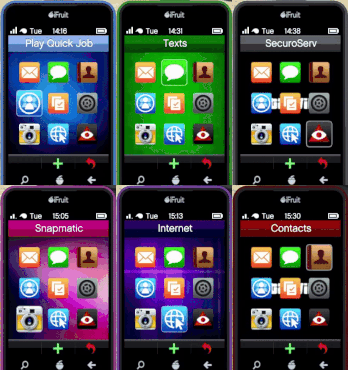
In the GTA V Game Informer cover story, Rockstar Games has said that GTA V will "preserve the mobile phone concept", but Rockstar has made changes to it, such as the player not receiving phone calls from friends all the time (as seen in GTA IV). Rockstar made these changes because of fans' feedback regarding how much story content was hidden on the phone, with these activities instead appearing on the map. Rockstar also said that even though phones will lose some "functionality", it will gain new features as well. Rockstar described it as being a contemporary phone, with Dan Houser saying that the player will use it for activities such as "accessing the internet", (much like a smartphone). All pictures taken in-game can be shared to the Rockstar Games Social Club via Snapmatic.
Michael De Santa owns an iFruit 9iX smartphone. However, he can be seen in 2004 with a Celltowa Cellphone, during the mission Prologue. Even though this is not a touch-screen phone, Michael will operate it as such if the player uses First-Person View. Trevor Philips has a Facade smartphone, and Franklin Clinton has a bitterSweet smartphone.
Protagonists' phones resemble the following real-life phones:
The protagonists' smartphones reference three of world's most popular smartphone platforms: Michael's references Apple iOS, Trevor's references Windows Phone, and Franklin's references Android OS. Their phones are also suited to their real-life counterpart typical users: Samsung phones are favored by youngsters, while iPhone is favored by wealthy people and Nokia has a reputation of surviving harsh conditions much like Trevor's lifestyle, and is known to be one the most durable phones out there (in the enhanced version, Trevor's phone has a crack on the screen, further referencing his reckless and violent way of life). The software of the three platforms, however, is mostly based on iOS, and aside from aesthetics in-game, all three phones function in the exact same way.
Unlike in previous games, contacts are not removed from phones - this means that the numbers for deceased characters remain in the player's contact lists long after their deaths.

Michael's phone clearly resembles an iPhone 4/iPhone 4s. In the enhanced version, it resembles an iPhone 5c.
Trevor's phone possibly resembles a Nokia Lumia 820, with the shape of a Nokia Lumia 730. In the enhanced version, however, it resembles a Sony Xperia E.
Franklin's phone resembles a Samsung Galaxy SIII. In the enhanced version, however, it resembles a BlackBerry Curve 9380 and/or a Google Nexus S.
Grand Theft Auto Online
In GTA Online, players can use the phone to access features such as calling characters for jobs, or using the Darnell Inc. app if they own the Garment Factory. The player can also use their phones to bank their cash into Maze Bank's website.
For the most part, the protagonist does not physically pull out their phone, which still allows for movement and combat. The only exception is when they use the Snapmatic app, although due to perspective, only other players can fully see them.
The protagonists' phone is identical to Michael's iFruit phone, only with different apps and the colour of the + button.
In the top left corner, there are 3 bars that represents a cellphone's signal strength.
Sources
Adapted from the original article, under CC BY-SA 3.0.